The Step-Back Phone: The Hidden iPhone Setting That Can Help You Live a Calmer, More Meaningful Life
How often do you pick up your phone without even thinking about it?
Perhaps you’re waiting for the kettle to boil, standing in line for a coffee, sitting on the train or relaxing on the couch after dinner. You unlock your phone “just for a minute” and before you know it, twenty or thirty minutes have disappeared.
It happens to almost everyone.
Our phones have become incredible tools. They help us communicate, navigate, work, learn and stay connected with family and friends. But somewhere along the way, many of us stopped using our phones intentionally and started using them automatically.
Imagine if your phone could actually help you slow down instead of constantly demanding your attention.
It turns out there’s a little-known setting already built into your iPhone that might do exactly that.
Discover Assistive Access
Hidden inside every iPhone is a feature called Assistive Access, located under Settings > Accessibility.
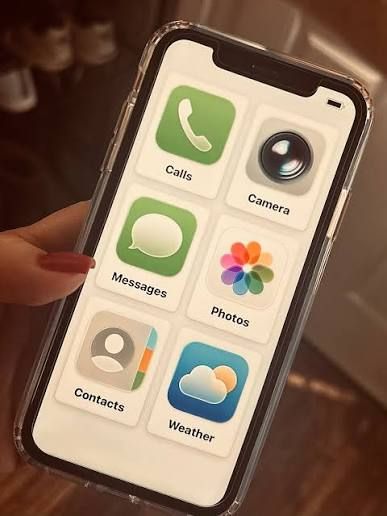
Apple originally created Assistive Access to make the iPhone easier to use for people with cognitive disabilities. It simplifies the phone by displaying larger icons, removing unnecessary clutter and allowing only selected apps to appear.
While it was never designed as a digital wellbeing tool, many people are discovering that its simplicity makes it surprisingly effective at reducing distractions.
Instead of opening your phone to dozens of apps competing for your attention, you’re presented with only the tools you actually need.
The result is a phone that feels calmer, simpler and far less overwhelming.
Why Willpower Isn’t the Answer
Most of us have tried limiting our screen time.
We’ve promised ourselves “just five minutes.”
We’ve set app timers.
We’ve deleted social media apps, only to reinstall them a week later.
That’s because the problem isn’t a lack of self-control.
Social media platforms and many modern apps are specifically designed to keep us engaged. Infinite scrolling, personalised content, autoplay videos and constant notifications encourage us to stay just a little longer.
Fighting that every day requires enormous willpower.
Assistive Access takes a different approach.
Instead of relying on self-control, it changes the environment.
You begin with a blank phone and choose only the apps you genuinely want available.
If an app isn’t there, it can’t distract you.
Sometimes the simplest solution is removing the temptation altogether.
What Happens When Your Phone Becomes Simpler?
When your phone stops demanding your attention every few minutes, something interesting happens.
You begin noticing the small moments that usually disappear into endless scrolling.
Instead of reaching for your phone, you might find yourself:
- Enjoying your morning coffee without distractions.
- Reading a few chapters of a book.
- Going for a walk around the neighbourhood.
- Listening to music without checking notifications.
- Cooking dinner with your family.
- Playing with your children.
- Calling a friend you’ve been meaning to catch up with.
- Writing in a journal.
- Simply sitting quietly and letting your mind wander.
These moments may seem insignificant on their own.
Together, they create a very different way of living.
Creating More Space in Your Day
Many people say they want a slower life.
Not necessarily a less productive one.
Just one that feels less rushed.
Less reactive.
Less stressful.
Modern life constantly competes for our attention. Emails, messages, news alerts, social media and endless entertainment leave very little room for quiet.
A simpler phone won’t solve every problem.
But it can give you something that’s becoming increasingly valuable.
Space.
Space to think.
Space to breathe.
Space to notice the people around you.
Space to make intentional choices instead of constantly reacting to notifications.
Sometimes that’s exactly what we need.
A Simpler First Phone for Children
Assistive Access may also offer parents another option when introducing children to their first mobile phone.
Many children need a phone so parents can contact them after school, during sport or while travelling independently.
The challenge is that most smartphones come with unlimited access to social media, web browsers, video platforms and games.
An older iPhone sitting unused in a drawer can become a much simpler communication device.
Parents can choose to include only essential apps such as:
- Phone
- Messages
- Maps
- Camera
Everything else can remain hidden.
Parents can also keep control of the Assistive Access exit passcode, making it much harder for children to simply switch back to the full version of the phone.
Of course, no technology replaces good parenting.
Children still need guidance, conversations about online safety and healthy digital habits.
But starting with a simpler phone may help reduce unnecessary distractions during those important early years.
Technology Should Support Your Life
Living more intentionally doesn’t mean rejecting technology.
It means deciding how technology fits into your life instead of allowing it to shape every spare moment.
Our phones should help us connect with people, not distract us from them.
They should help us create memories, not simply consume content.
Sometimes the greatest benefit of putting your phone down isn’t what you’re missing online.
It’s what you’re discovering in the real world.
A conversation.
A sunset.
A hobby.
A good book.
A quiet cup of tea.
A walk without headphones.
Or simply a few moments where your mind has room to think.
Start Small
You don’t need to throw your smartphone away.
You don’t need to give up technology altogether.
And you certainly don’t need to disappear off the grid.
Sometimes living a calmer, less stressful life begins with one small change.
One setting.
One decision.
One reminder that your phone should be a tool—not the place where your time quietly disappears.
The goal isn’t to spend less time on your phone for the sake of it.
The goal is to spend more time on the things that genuinely make life richer, calmer and more meaningful.
Editor’s Note: If you’re curious to try Assistive Access, you’ll find it under Settings > Accessibility > Assistive Accesson your iPhone. Spend a few minutes setting it up with only the apps you truly need—you might be surprised by how different your phone, and your day, begins to feel.
If Shakespeare Had an iPhone, Would He Still Write Love Letters?